• Skip to primary navigation
  • Skip to main content
Velocity Ascent

Velocity Ascent

Looking toward tomorrow today

  • Research
  • Design
  • Development
  • Strategy
  • About
    • Home
    • Who we work with…
      • Product Leaders
      • Innovation Teams
      • Founder-Led Organizations
    • Services
    • Contact Us
  • Show Search
Hide Search

the Blog

The Artistry of Prompt Engineering

Joe Skopek · May 1, 2024 ·

At its core, prompt engineering embodies a blend of technical precision and creative writing finesse.

In the realm of artificial intelligence (AI), prompt engineering stands as a pivotal technique, wielding immense power in shaping the capabilities and behaviors of AI models. This post examines the artistry, potential and potency of prompt engineering, focusing on a variety of prominent platforms: ChatGPT, Davinci, Haiper, and Midjourney.

A prompt is natural language text describing the task that an AI should perform.

As we unravel the intricacies of this programming language, we’ll uncover how it empowers users to mold AI outputs to suit diverse needs and purposes.

Understanding Prompt Engineering:

Prompt engineering is the process of structuring an instruction that can be interpreted and understood by a generative AI model.

Prompt engineering revolves around crafting precise instructions or prompts that guide AI models in generating desired outputs. These prompts serve as the input for AI systems, influencing the content, tone, and style of their responses. Through careful crafting, users can steer AI towards generating outputs that align with specific objectives or criteria.

Chain-of-thought (CoT) prompting

Introduced in Wei et al. (2022), chain-of-thought (CoT) prompting enables complex reasoning capabilities through intermediate reasoning steps. The technique is aimed at enhancing the reasoning ability of large language models (LLMs) by guiding them through a problem-solving process in a series of intermediate steps before arriving at a final answer. This approach mimics a train of thought, facilitating logical reasoning and addressing challenges in tasks requiring multi-step solutions, such as arithmetic or commonsense reasoning questions. For instance, when presented with a question like “The cafeteria had 23 apples. If they used 20 to make lunch and bought 6 more, how many apples do they have?” a CoT prompt could guide the LLM to break down the problem into sequential steps, leading to a comprehensive answer.
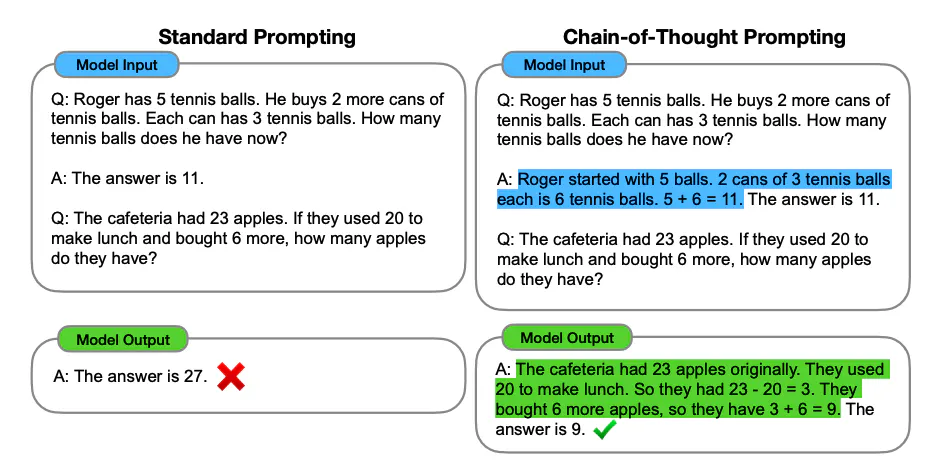
Chain-of-thought prompting enables large language models to tackle complex arithmetic, commonsense, and symbolic reasoning tasks- reasoning processes are highlighted. Image Source: Wei et al. (2022)

Initially, CoT prompts included a few question-and-answer examples, making it a few-shot prompting technique. However, the effectiveness of CoT has been demonstrated with the addition of simple prompts like “Let’s think step-by-step,” transitioning it into a zero-shot prompting technique and enabling easier scalability without the need for numerous specific examples. When applied to PaLM, a 540B parameter language model, CoT prompting significantly improved its performance on various tasks, achieving state-of-the-art results on benchmarks such as the GSM8K mathematical reasoning benchmark. Further enhancements can be achieved by fine-tuning models on CoT reasoning datasets, which could lead to improved interpretability and performance.

Platform Agnostic: Exploring Prompt Engineering on ChatGPT, Davinci, Haiper, and Midjourney

There currently exists a myriad of tools and frameworks designed to harness the power of artificial intelligence. Among these, ChatGPT and Midjourney stand out as prominent examples, each offering unique capabilities and applications.

ChatGPT: AI Copywriting

ChatGPT, developed by OpenAI, stands as a pioneering platform in the domain of conversational AI. Prompt engineering plays a fundamental role in shaping the interactions facilitated by ChatGPT. By crafting tailored prompts, users can steer conversations in desired directions, maintain coherence, and achieve specific conversational goals.

Techniques in Prompt Engineering for ChatGPT:

  1. Contextual Prompting: Leveraging contextual cues within prompts to provide relevant information and guide the AI’s understanding of the conversation’s flow.
  2. Persona Establishment: Crafting prompts that establish a consistent persona for the AI, shaping its tone, demeanor, and overall personality.
  3. Prompt Refinement: Iteratively refining prompts based on AI responses to achieve optimal conversational outcomes.
121 separate runs of /imagine a sailboat --sref random

Midjourney: AI Graphics

AI Art Generator From Text

Midjourney emerged early as a novel platform in the AI landscape, offering tools and frameworks for prompt engineering tailored towards diverse applications. With a focus on narrative generation and storytelling, Midjourney empowers users to craft compelling narratives through strategic prompt design.

Techniques in Prompt Engineering for Midjourney.

Narrative Structure, Emotional Contextualization and Dynamic Prompting

Narrative

Narrative Structure: Designing prompts that outline the desired narrative arc, including key plot points, character interactions, and thematic elements.

Emotion

Emotional Contextualization: Incorporating emotional cues and context within prompts to evoke specific feelings or reactions from the AI-generated narrative.

Dynamic

Dynamic Prompting: Employing dynamic prompts that adapt based on AI-generated content, ensuring coherence and narrative continuity.

slide 1
Image Slide 2
Image Slide 1
Image Slide 3
Image Slide 3
Image Slide 3
Image Slide 3
Image Slide 3
Image Slide 3
Image Slide 3
Image Slide 3
previous arrowprevious arrow
next arrownext arrow

In the example above we see the progression of the art though adjustment and refinement. Each slide represents the process of engineering the prompts, for example “PROMPT: Midjourney – young boy, age 5-6 years old, wearing blue helmet, holding steering wheel, in red 1952 Murray Champion Pedal Car rolling toward camera, smiling, natural lighting, Nikon D850 28mm, global illumination –ar 16:9 –v 6.0” Prompts can be very descriptive whether it is choosing an actual real world camera or a time of day. The end result can be very compelling – will it replace real world photography for example. I think in some cases where quick imagery is needed the tool creates passable art. Venturing into highly detailed brand-accurate art is still evolving.

garbage in, garbage out (GIGO)

On two occasions I have been asked, “Pray, Mr. Babbage, if you put into the machine wrong figures, will the right answers come out?” … I am not able rightly to apprehend the kind of confusion of ideas that could provoke such a question.

— Charles Babbage, Passages from the Life of a Philosopher[5]

Haiper: AI Video

Haiper emerges as a groundbreaking advancement in the realm of artificial intelligence, offering a potential trajectory towards achieving Artificial General Intelligence (AGI). Its distinctive feature lies in its utilization of a unique perceptual foundation model—a feat achieved by only a select few in this domain.

In a fresh take on AI initiatives, Haiper’s approach is rooted in a philosophy that prioritizes not only technological prowess but also community collaboration and creative synergy. Founded by distinguished alumni from industry giants like Google DeepMind and TikTok, as well as leading research labs in academia, Haiper is working to blend next-gen machine learning with a refined perspective on creativity.

This innovative approach potentially positions Haiper as more than just another AI tool. It is a versatile creativity platform that breaks with traditional industry boundaries, placing emphasis on fun, shareability, and community engagement.


Davinci: AI Graphics & Video (Multisource)

AI Art Generator From Text

DaVinci features the latest state-of-the-art AI technology to generate unique artworks and photorealistic images. It offers various AI models to choose from, including its own custom AI model, DaVinci XL, Stable Diffusion, DALL·E 3, and Midjourney.

The newest release, DaVinci Resolve 19, adds two new AI features that make video editing more efficient: the IntelliTrack AI point tracker for object tracking, stabilization and audio panning, and UltraNR, which uses AI for spatial noise reduction.

The Artistry of Prompt Engineering:

At its core, prompt engineering embodies a blend of technical precision and creative writing finesse. It requires an understanding of AI capabilities, linguistic nuances, and user objectives. Crafting effective prompts entails a deep appreciation for language, narrative structure, and contextual subtleties, elevating it to an art form in its own right.

Prompt engineering serves as a cornerstone in the development and deployment of AI systems, enabling users to wield unprecedented control over AI-generated outputs. As AI continues to evolve, the mastery of prompt engineering will remain indispensable, unlocking new frontiers in human-AI collaboration and creativity.

Who was the first prompt engineer?

Pinpointing the exact “first” prompt engineer in the context of AI is a bit challenging, as prompt engineering has evolved over time with the development of AI technologies. However, we can attribute the early origins of prompt engineering to researchers and developers who explored techniques to influence the behavior of AI systems through tailored inputs.

In the realm of natural language processing and early chatbots, developers experimented with crafting prompts or inputs to elicit specific responses from AI models. For example, in the 1960s and 1970s, Joseph Weizenbaum created ELIZA, one of the earliest chatbots, which relied on pattern-matching techniques to simulate conversation. While not exactly prompt engineering in the modern sense, Weizenbaum’s work laid the groundwork for manipulating interactions with AI systems through carefully designed inputs.
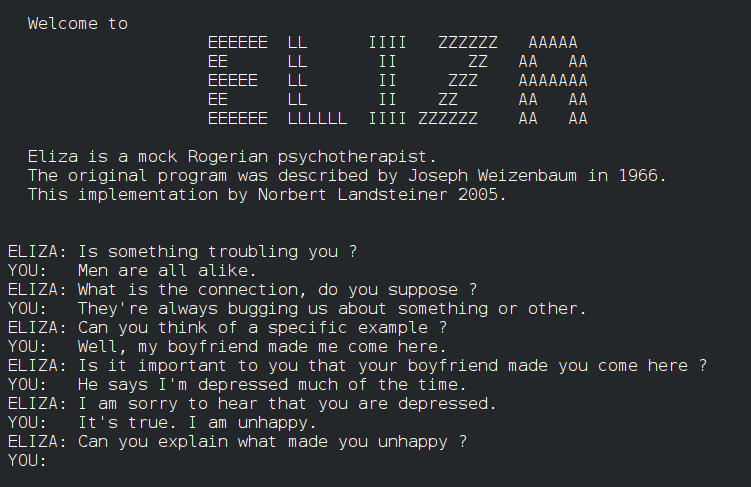
The most famous script, DOCTOR, simulated a psychotherapist of the Rogerian school (in which the therapist often reflects back the patient’s words to the patient),[9][10][11] and used rules, dictated in the script, to respond with non-directional questions to user inputs. 

As AI technologies advanced, particularly with the rise of deep learning and large language models like GPT (Generative Pre-trained Transformer), prompt engineering gained prominence as a method for fine-tuning and controlling AI-generated outputs. Researchers, developers, and practitioners across academia and industry contributed to the development and refinement of prompt engineering techniques, shaping its evolution into a sophisticated discipline.

So, while there may not be a single “first” prompt engineer, the concept emerged gradually as AI technologies evolved, with contributions from various individuals and communities.

An uncritical embrace of technology?

The “uncritical embrace of technology” refers to a phenomenon where individuals, or society at large, enthusiastically adopt and rely on technological advancements without adequately considering their potential drawbacks, limitations, or broader societal implications. This uncritical acceptance often stems from the perceived benefits or conveniences offered by technology, leading to a lack of critical reflection on its long-term effects.

In conversational interfaces such as ChatGPT or narrative generation platforms like Midjourney users may enthusiastically embrace these technologies for their convenience, entertainment value, or utility in various applications. They may appreciate the ease of generating conversational content or narratives using AI-powered platforms, without necessarily critically examining the underlying algorithms or potential biases in the generated outputs.

Similarly, developers and organizations may prioritize the development and deployment of conversational AI and narrative generation tools to meet market demand, improve user experiences, or achieve specific business objectives. In doing so, they may focus more on technical innovation and functionality rather than thoroughly evaluating the ethical implications or societal impacts of these technologies.

Several factors contribute to the uncritical embrace of technology:

  1. Techno-optimism: Many people hold a belief in the inherent goodness or progressiveness of technology, viewing it as a solution to various problems and a driver of societal advancement. This optimism can lead to a bias towards embracing new technologies without fully evaluating their potential risks.
  2. Market-driven innovation: In a competitive market environment, there is often pressure for companies to continuously innovate and release new products or services. This drive for innovation can prioritize speed and novelty over thorough consideration of ethical, social, or environmental implications.
  3. Convenience and efficiency: Technology often promises to streamline tasks, improve efficiency, and enhance convenience in various aspects of life. As a result, individuals may readily adopt new technologies without questioning their broader impacts, focusing instead on immediate benefits.
  4. Social influence and peer pressure: Social norms and peer influence can play a significant role in shaping attitudes towards technology. If a particular technology becomes widely adopted or socially endorsed, individuals may feel compelled to embrace it without questioning its implications.
  5. Limited understanding: Not everyone possesses a deep understanding of the underlying mechanisms or implications of technology. As a result, individuals may accept technological innovations at face value, without fully grasping their potential consequences.

The uncritical embrace of technology can have several consequences, including:

  • Ethical dilemmas: Technologies may raise ethical questions related to privacy, surveillance, autonomy, and fairness, which may not be adequately addressed if adoption is uncritical.
  • Social impacts: The rapid adoption of technology can lead to societal changes that may exacerbate inequalities, disrupt traditional industries, or alter social norms and behaviors.
  • Environmental concerns: Some technologies may have negative environmental impacts, such as increased energy consumption, resource depletion, or pollution, which may be overlooked in the pursuit of innovation.

To mitigate the risks associated with the uncritical embrace of technology, it’s essential to promote critical thinking, ethical considerations, and inclusive decision-making processes in the development, deployment, and regulation of technology. This approach can help ensure that technological advancements are aligned with broader societal values, goals, and well-being.

Sources:

Here are sources and links where you can find more information on the subjects of technology ethics, societal implications of technology, and critical thinking:

Technology Ethics:

  1. The Markkula Center for Applied Ethics – Technology Ethics: This center, affiliated with Santa Clara University, offers a wealth of resources on technology ethics, including articles, case studies, and research papers.
    Website: https://www.scu.edu/ethics/ethics-resources/ethical-decision-making/technology-ethics/
  2. IEEE Global Initiative on Ethics of Autonomous and Intelligent Systems: The IEEE Global Initiative provides guidelines, reports, and resources on the ethical development and deployment of autonomous and intelligent systems.
    Website: https://ethicsinaction.ieee.org/

Societal Implications of Technology:

  1. Pew Research Center – Internet & Technology: Pew Research Center conducts surveys and studies on the impact of technology on society, covering topics such as digital privacy, online behavior, and the future of work.
    Website: https://www.pewresearch.org/internet/
  2. MIT Technology Review: MIT Technology Review provides in-depth analysis and reporting on emerging technologies and their societal impacts, including articles on AI ethics, data privacy, and digital transformation.
    Website: https://www.technologyreview.com/

Critical Thinking:

  1. The Foundation for Critical Thinking: This organization offers resources and materials to promote critical thinking skills, including books, articles, and online courses.
    Website: https://www.criticalthinking.org/
  2. The Critical Thinking Community: The Critical Thinking Community provides educational resources and tools for fostering critical thinking skills in both academic and professional settings.
    Website: https://www.criticalthinking.org/pages/about-the-critical-thinking-community/858

Additional Resources:

  1. Stanford Encyclopedia of Philosophy – Philosophy of Technology: The Stanford Encyclopedia of Philosophy offers an overview of the philosophy of technology, covering topics such as technological determinism, ethics, and social impacts.
    Website: https://plato.stanford.edu/entries/technology/
  2. Center for Humane Technology: The Center for Humane Technology advocates for the ethical design and use of technology to promote well-being and human flourishing. Their website features articles, podcasts, and resources on topics related to digital well-being and technology addiction.
    Website: https://www.humanetech.com/

These sources provide valuable insights and perspectives on the ethical, social, and cognitive dimensions of technology, empowering individuals to engage critically with the challenges and opportunities presented by technological advancements.

Master the Script: How Teleprompting Transforms Leadership Communication

velocityascent · April 29, 2024 ·

Deliver impactful presentations with confidence and precision – experienced Teleprompter Operators make it possible.

Navigating the ever-changing environment of business presentations requires not only mastering the art of effective communication but a knowledge of the latest presentation platforms.

An experienced teleprompter operator can be a vital ally who possesses in-depth knowledge of modern teleprompter systems and equipment, ensuring seamless setup and operation during presentations. Whether addressing shareholders, presenting at conferences, or engaging with the media, leaders need to convey their message confidently and convincingly – without falling victim to tech issues..

What is Teleprompting?

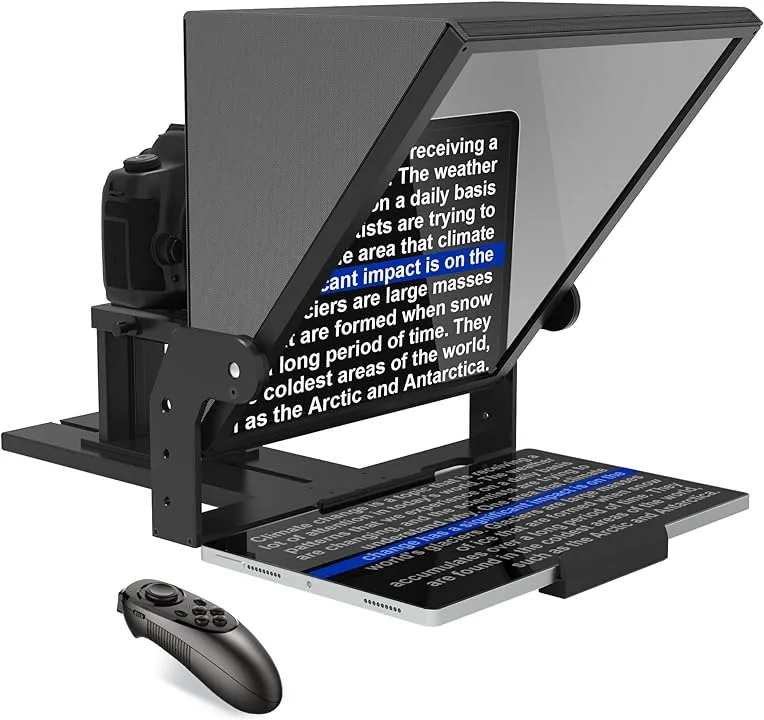
Teleprompting is a technique used to deliver speeches or presentations effectively by displaying text on a screen in front of the presenter, allowing them to read the script while maintaining eye contact with the audience. It’s commonly seen in various settings, including news broadcasts, political speeches, corporate presentations, and live events.

Teleprompter schematic representation: (1) Video camera; (2) Shroud; (3) Video monitor; (4) Clear glass or beam splitter; (5) Image from subject; (6) Image from video monitor

For C-suite leaders, startup founders, and corporate officers, teleprompting can be essential for several reasons:

  1. Maintaining Professionalism: Executives need to deliver polished presentations or speeches that reflect positively on their organization. Teleprompting ensures that they deliver their message smoothly and confidently, without stumbling over their words or losing their place in the script.
  2. Saving Time: Executives have busy schedules, and preparing for speeches or presentations can be time-consuming. Teleprompting allows them to focus on other aspects of their work while ensuring that they can deliver their message effectively when the time comes to present.
  3. Enhancing Delivery: Reading from a teleprompter can help executives maintain a steady pace and tone, ensuring that their message is conveyed clearly and convincingly to the audience.
  4. Reducing Anxiety: Public speaking can be nerve-wracking, even for experienced professionals. Teleprompting provides a sense of security, as executives can rely on the script to guide them through their presentation, reducing anxiety and allowing them to focus on engaging with the audience.


Teleprompting supports executives in delivering polished presentations that reflect positively on their organization, saving time, enhancing delivery by maintaining pace and tone, and reducing anxiety by providing security and guiding them through presentations.

There are several types of teleprompting systems available, ranging from traditional hardware-based setups to more modern software-based solutions:

Hardware Teleprompters: These systems consist of a transparent glass or acrylic screen mounted in front of the camera lens, onto which the text is reflected from a monitor located below the camera. A Teleprompter Operator will scroll the text the speaker can read while maintaining eye contact with the audience through the camera lens.

Software Teleprompters: With the advancement of technology, software-based teleprompting solutions have become increasingly popular. These applications run on computers, tablets, or smartphones and display the text on the screen for the speaker to read. Software teleprompters often offer additional features such as adjustable scrolling speed, font customization, and remote control capabilities.

This can be particularly useful for speakers who need to make last-minute changes to their scripts. Software teleprompters may be more comfortable for tech-savy presenters who want total control over their presentation and can trouble-shoot any issues themselves without the use of a Teleprompter Operator.

AI has also started to make inroads into the field of teleprompting:

  1. AI-Assisted Teleprompting: Some teleprompting software now incorporates AI algorithms to improve the user experience. For example, AI can analyze the speaker’s speech patterns and adjust the scrolling speed of the text to match their natural pace, ensuring a smoother delivery. This form of presentation is in its early stage and will improve over time.
  2. Speech Recognition: AI-powered speech recognition technology can automatically generate scripts from spoken words, the final script can be displayed on the teleprompter screen.

Overall, teleprompting plays a crucial role in helping C-suite leaders, startup founders, and corporate officers deliver compelling presentations and speeches, and with the integration of AI technology, it continues to evolve to meet the future needs of modern communicators.

“Effective communication serves as the cornerstone of success, and Teleprompter Operators play a crucial role in ensuring that message delivery remains clear, concise, and impactful.”

A Teleprompter Operator is a skilled professional responsible for operating and managing teleprompter systems during presentations, speeches, or recordings. Their primary role is to ensure the smooth and efficient operation of the teleprompter, including setting up the equipment, loading and formatting scripts, adjusting settings to suit the presenter’s preferences, and operating the system during the presentation.

Teleprompter Operators may also provide support during rehearsals, offering feedback and guidance to presenters to improve their delivery. Additionally, they may assist with troubleshooting technical issues that may arise during the presentation, ensuring a seamless and uninterrupted flow of communication. Overall, Teleprompter Operators play a crucial role in facilitating effective communication by enabling presenters to deliver their messages confidently and smoothly.

Using a Teleprompter Operator offers many benefits that enhance the quality and impact of a presentation. First, they bring technical expertise, ensuring that the teleprompter system operates smoothly and efficiently, allowing the presenter to focus solely on delivering the message with confidence. Second, Teleprompter Operators offer valuable support during pre-presentation preparation, providing feedback and guidance to improve delivery. Their presence also alleviates the burden of managing the teleprompter system, allowing presenters to stay fully engaged with your audience without worrying about technical issues.

Ultimately, by leveraging the services of a Teleprompter Operator, you can elevate the professionalism and effectiveness of your presentation, leaving a lasting impression on your audience.

Graphic Design: Human handwork in a digital age.

velocityascent · April 24, 2024 ·

Discover the essence of handmade artistry merged seamlessly with digital design in the creative realm of Glenn Wolk.

With a penchant for infusing the raw charm of watercolors with the precision of digital techniques, the graphic designer Glenn Wolk has cultivated a distinctive artistic flair coveted by renowned brands such as Ralph Lauren, Tommy Hilfiger, and New Balance.

Glenn’s portfolio extends beyond fashion, encompassing collaborations with musical icons like Elton John, The Rolling Stones, Eminem, and Lady Gaga, where his designs grace posters and merchandise, embodying the essence of each artist’s persona.

Graphic Designer Glenn Wolk’s recent master class at Domestika.

Recently Wolk’s innovative process caught the eye of the team at Domestika who thought he would be an ideal candidate to teach a Master Class on his process in designing creations. The class covers the process from initial concept sketching to meticulous digital refinement, resulting in a harmonious fusion of traditional and contemporary methodologies.

Based in Brooklyn, New York graphic designer, Glenn Wolk, creates stunning one of a kind art for fashion, entertainment and print media. He designs graphics and paintings for The Rolling Stones, Eminem, and The Beatles, among other iconic singers and bands. Glenn also supports the causes he belives in by creating work for nonprofits making a difference in the community.

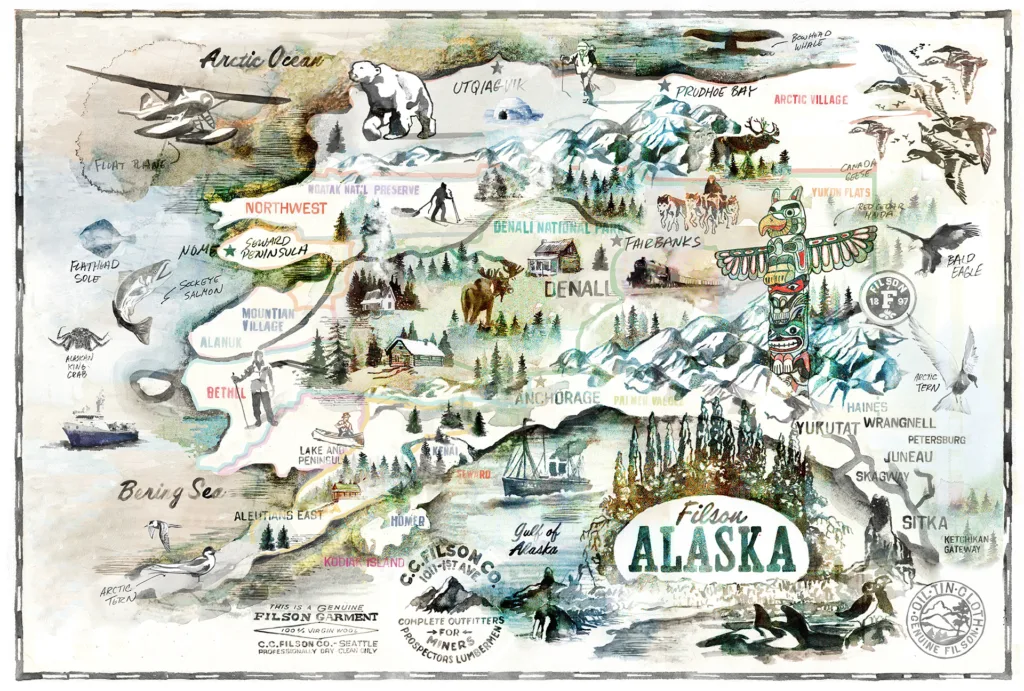
In the slide show above, step into the vibrant world of Glenn Wolk’s graphic designs, where fashion, entertainment, and traditional arts converge to create visually stunning narratives that captivate the imagination. Observing Wolk’s hand work, it’s impossible not to be drawn into the dynamic interplay of color, form, and style that defines his signature aesthetic.

Promotional Domestika video collaboration produced with Velocity Ascent.

New York City has always been Glenn’s natural habitat and the energy, grit and creativity star frequently in his creations. From the glossy pages of high-fashion magazines to the electrifying posters adorning the city’s streets, Wolk’s designs command attention and spark conversation. In the video above, we have the opportunity to tag along with Glenn as he walks through neighborhoods of inspiration. In the realm of fashion, entertainment, and media, Glenn Wolk stands as a visionary artist, shaping trends and leaving an indelible mark on both the visual and cultural landscape.

Glenn Wolk is an example of the diverse group of individuals in the VA Network who bring a bespoke skill sets to the team at large. Glenn’s ability to create a unique visual experience is second to none.

Streamlining Startup Operations: Best Practices for Efficiency and Growth

velocityascent · April 19, 2024 ·

From Chaos to Cohesion: Transforming Your Startup’s Day-to-Day Operations for Success

As startups journey through the tumultuous waters of entrepreneurship, they often face a common challenge: the lack of standardized business practices. From disjointed communication channels to scattered team coordination, the chaos of day-to-day operations can hinder productivity and impede growth, even in late-stage startups. But fear not! By implementing best practices and embracing streamlined workflows, startups can shed the weaknesses of disorganization and forge a path toward efficiency and success.

Embrace Unified Communication Channels

“In a world of fragmented communication, unity is strength. Embrace unified channels to streamline communication and foster collaboration.”

One of the first steps toward streamlining startup operations is to establish unified communication channels. Whether it’s through email, instant messaging platforms, or project management tools, having a centralized hub for communication ensures that team members are on the same page and information flows seamlessly across the organization. By consolidating communication channels, startups can reduce the risk of miscommunication, enhance team collaboration, and accelerate decision-making processes.

Cultivate a Centralized Point of Contact

“In the midst of chaos, clarity is key. Cultivate a centralized point of contact to serve as the anchor for your startup’s day-to-day operations.”

In the fast-paced world of startups, having a central go-to person for all team members is essential for maintaining order and coherence. Whether it’s a dedicated project manager, operations lead, or office manager, having a centralized point of contact ensures that questions are answered promptly, issues are addressed effectively, and tasks are coordinated efficiently. This individual serves as the linchpin of the organization, keeping operations running smoothly and fostering a culture of accountability and responsibility.

Implement Standardized Processes and Workflows

“Consistency breeds efficiency. Implement standardized processes and workflows to streamline operations and drive sustainable growth.”

To overcome the challenges of disorganization, startups must establish standardized processes and workflows across key areas of operation, including project management, customer support, and financial management. By defining clear guidelines, automating repetitive tasks, and leveraging technology solutions, startups can minimize errors, optimize resource allocation, and improve overall efficiency. From onboarding new employees to managing customer inquiries, standardized processes ensure consistency and reliability, enabling startups to scale with confidence.

“Innovation is the catalyst for transformation. Leverage technology solutions to automate tasks and integrate systems, freeing up time for strategic initiatives.”

In the digital age, technology is a powerful ally in the quest for operational excellence. Startups can leverage a myriad of software solutions and tools to automate repetitive tasks, streamline workflows, and integrate systems seamlessly. Whether it’s project management software, CRM platforms, or collaboration tools, technology solutions empower startups to work smarter, not harder. By embracing automation and integration, startups can optimize efficiency, enhance agility, and unlock new opportunities for growth.

The effectiveness of an office environment in fostering innovation depends on how well it aligns with the specific needs and working styles of the individuals and teams within the organization.

Foster a Culture of Continuous Improvement

“Innovation is not a destination but a journey. Foster a culture of continuous improvement to adapt, evolve, and thrive in an ever-changing landscape.”

Last but not least, startups must embrace a mindset of continuous improvement to stay ahead of the curve. By soliciting feedback from team members, analyzing performance metrics, and iterating on processes, startups can identify areas for optimization and drive ongoing improvement. This culture of continuous learning and adaptation ensures that startups remain agile, resilient, and responsive to the evolving needs of their customers and the market.

Paving the Path to Operational Excellence

“In the face of chaos, there is opportunity. By embracing best practices and streamlining day-to-day operations, startups can shed the weaknesses of disorganization and pave the path to operational excellence.”

In the fast-paced world of startups, operational excellence is the cornerstone of success – unified communication channels, centralized points of contact, standardized processes, leveraging technology, and fostering a culture of continuous improvement, startups can overcome the challenges of disorganization and propel themselves toward efficiency, growth, and success.

Data Visualization for Business Professionals

velocityascent · March 12, 2024 ·

If all graphs are a type of chart, and all charts are not graphs – what are diagrams?

Graphs, charts, and diagrams serve as powerful tools that offer clarity, enhance communication, and drive informed decision-making. By transforming complex datasets and ideas into visually compelling representations, business professionals gain insights, spot trends, and collaborate more effectively. From facilitating understanding to identifying opportunities and risks, data visualization plays a vital role in empowering organizations to thrive in a competitive environment.

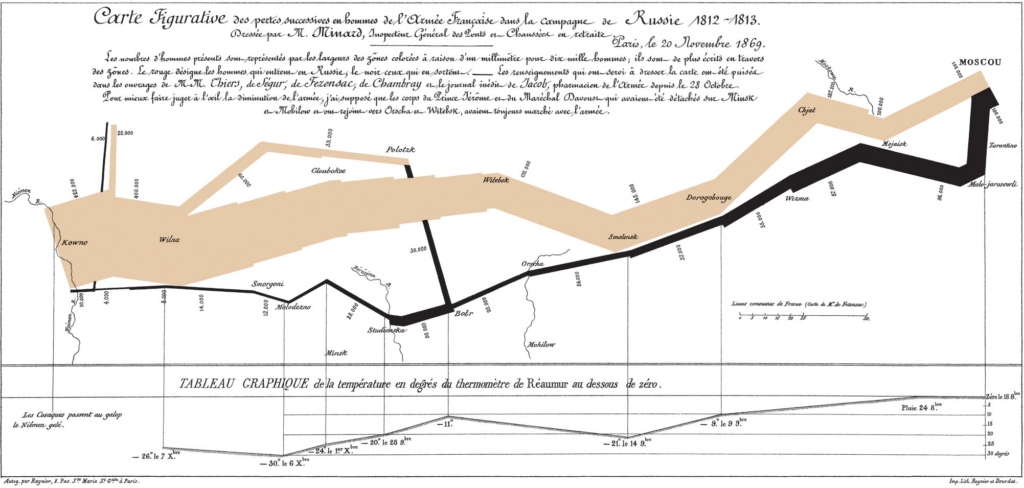
Charts, encompassing bar charts, pie charts, and scatter plots, among others, excel in presenting data comparisons, distributions, and compositions, respectively. They offer a concise snapshot of information, making them ideal for conveying trends and relationships in a straightforward manner. Graphs, including line graphs, area graphs, and histograms, specialize in showcasing data trends and distributions

Charles Minard’s 1869 Sankey chart showing the number of men in Napoleon’s 1812 Russian campaign army, their movements, as well as the temperature they encountered on the return path.

over time or across variables, aiding in trend analysis and pattern recognition. Diagrams, such as flowcharts, network diagrams, and organizational charts, are instrumental in illustrating processes, hierarchies, and relationships, facilitating understanding and decision-making in complex systems.

Different types of graphs

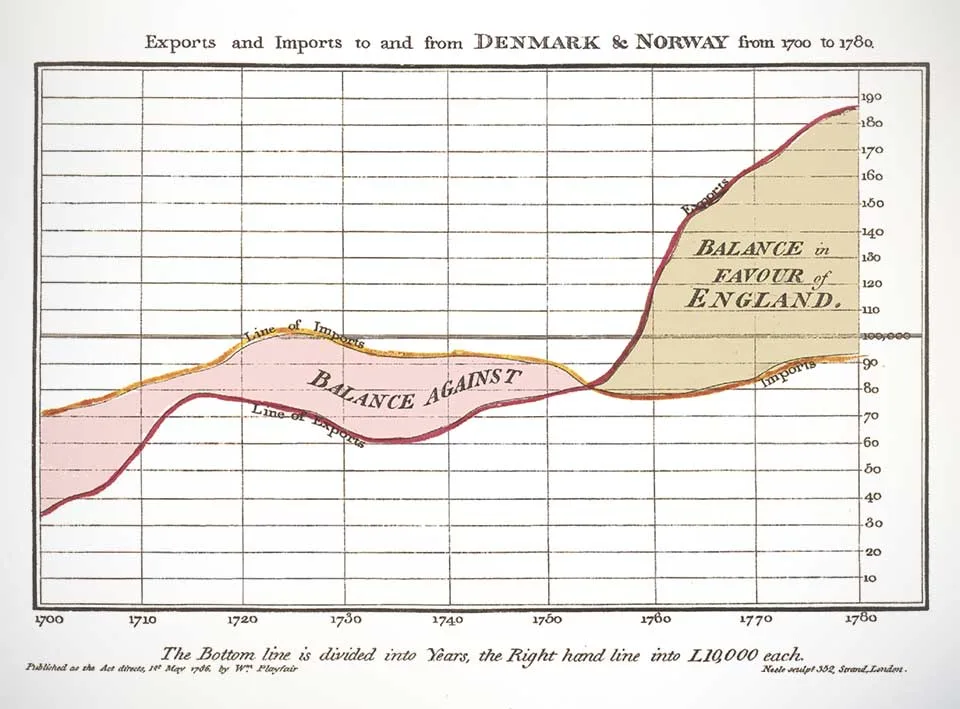
The concept of graphs, as in graphical representations of data, has been around for centuries, with various scholars and scientists contributing to its development over time. One notable figure in the history of graphs is William Playfair, a Scottish engineer and economist, who is often credited with inventing several types of graphs in the late 18th century. Playfair created the line graph, bar chart, and pie chart, which are fundamental components of modern data visualization.

Playfair’s trade-balance time-series chart, published in his Commercial and Political Atlas, 1786

However, it’s important to note that graphical representations of data have been used in different forms throughout history by different civilizations for various purposes, such as illustrating statistical information, depicting geographical features, and conveying mathematical concepts. So, while Playfair made significant contributions to the development of modern graphs, the origins of graphical representations of data can be traced back much further.

Line Graphs: Utilized to illustrate fluctuating data trends over specified timeframes, such as temperature variations across different dates, line graphs provide a succinct depiction of relational data dynamics.

Bar Graphs: With their simple yet impactful presentation, bar graphs facilitate easy comparison of numerical values, making them indispensable for analyzing inventories, group sizes, and financial forecasts. Widely employed by marketing firms, they effectively showcase ratings and survey responses.

Pictographs: Employing images or symbols in lieu of bars, pictographs offer a visually engaging means of representing data, ideal for conveying information in formats like infographics. For instance, depicting book sales over several months using book icons adds an intuitive dimension to the data.

Histograms: Ideal for illustrating the distribution of numeric data across categories, histograms provide valuable insights into statistical patterns. Whether portraying age demographics within a population or other categorical distributions, histograms offer a comprehensive overview of data distribution.

Area Graphs: Capturing changes in one or multiple quantities over time, area graphs are instrumental in identifying trends and patterns. By incorporating color-coded segments, they elucidate how diverse quantities contribute to an overarching trend, aiding businesses in strategic decision-making processes.

Scatter Plots: Offering a visual representation of the relationship between two variables, scatter plots provide invaluable insights into correlations. Whether analyzing the connection between height and weight or other paired variables, scatter plots reveal patterns that inform data-driven strategies.

Different types of charts

In today’s data-driven world, the ability to effectively communicate complex information is key. Charts serve as powerful tools for transforming raw data into actionable insights, providing clarity and context in a visually appealing manner. Pioneers John von Neumann, Herman H. Goldstine, and Arthur W. Burks laid the groundwork for electronic computing back in 1947 with their seminal work, “Preliminary Discussion of the Logical Design of an Electronic Computing Instrument.” They created the first computer flow charts to simplify and streamline the understanding of intricate data sets.

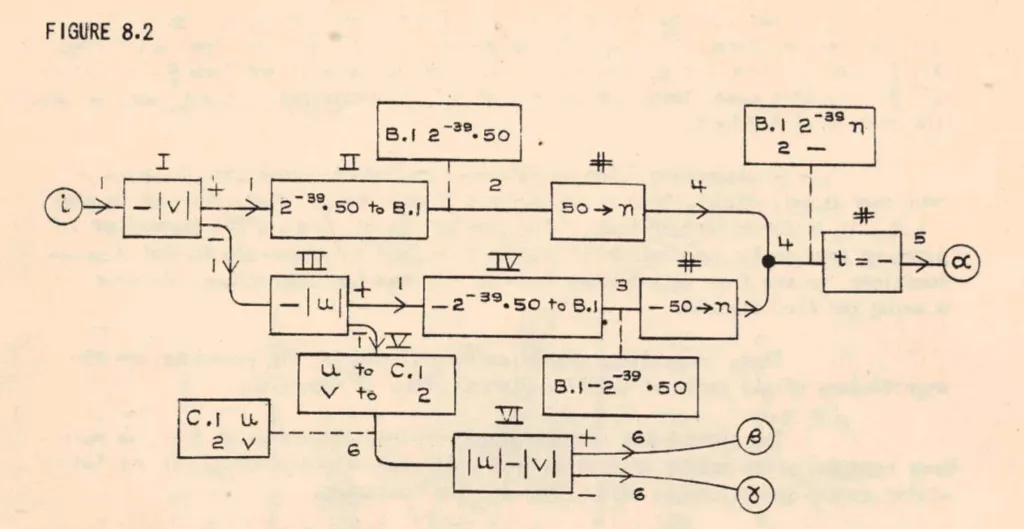
1947 – John Von Neumann created the first theoretical discussion of programming through use of ‘flow diagram’ (which eventually became flow chart and finally, flowchart) as a logically complete and precise notation for expressing a mathematical problem, and eventually formed the basis for all computer programming.

From bar graphs to scatter plots, these visual aids have become indispensable assets in the modern business landscape, facilitating informed decision-making and driving success.

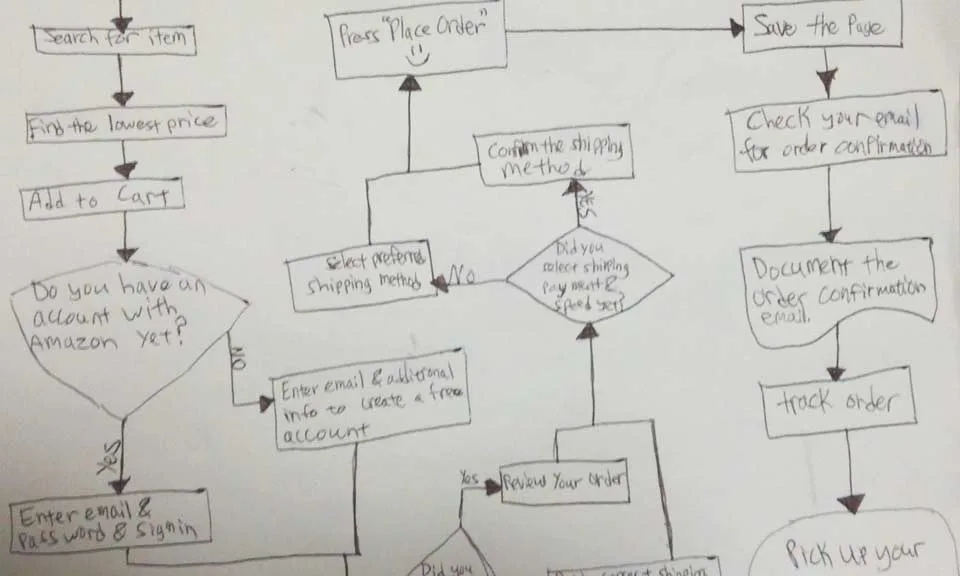
Flowcharts: Essential for mapping out processes from inception to conclusion, flowcharts elucidate decision points and possible pathways within complex workflows. A flowchart can also be considered as a diagram that represents a process or workflow through a series of shapes connected by arrows. It is widely used in business, engineering, and computer programming to illustrate the steps involved in completing a task or achieving a goal. Flowcharts typically start with a starting point (usually represented by an oval), followed by various actions or decisions represented by rectangles or diamonds, and ending with an outcome or final step. They provide a visual roadmap for understanding the sequence of actions and decision points within a process.

Pie Charts: Efficiently conveying proportions within a whole, pie charts are instrumental in visualizing segments of data. Whether delineating demographic segments or budget allocations, pie charts offer a succinct overview in business presentations. A pie chart is typically a circular statistical graphic divided into slices to illustrate numerical proportions. Each slice represents a proportionate part of the whole, with the size of each slice corresponding to the relative magnitude of the data it represents. They provide a quick and intuitive way to understand how different components contribute to a total or overall value.

Gantt Charts: Invaluable for project management, Gantt charts delineate project schedules, providing a comprehensive overview of tasks and timelines. By visually tracking progress and milestones, they ensure seamless project execution.

Waterfall Charts: Designed to showcase variances over time, waterfall charts elucidate the impact of successive changes on an initial value. Whether analyzing financial statements or profit and loss trends, they provide a nuanced understanding of evolving data sets.

Gauge Charts: Offering a visual representation akin to a dial, gauge charts pinpoint specific data points within predefined ranges. From illustrating performance metrics to tracking revenue goals, gauge charts provide at-a-glance insights into key business parameters.


Funnel Charts: With their distinctive shape, funnel charts illustrate the progression of values through sequential stages. Whether tracking sales pipelines or website traffic, funnel charts offer a dynamic portrayal of evolving data trends.

Bullet Charts: Tailored to measure performance against predefined targets, bullet charts are invaluable for assessing progress towards key objectives. Whether tracking profits or expenses, they provide a comprehensive overview of key performance indicators (KPIs) within a single visual framework.

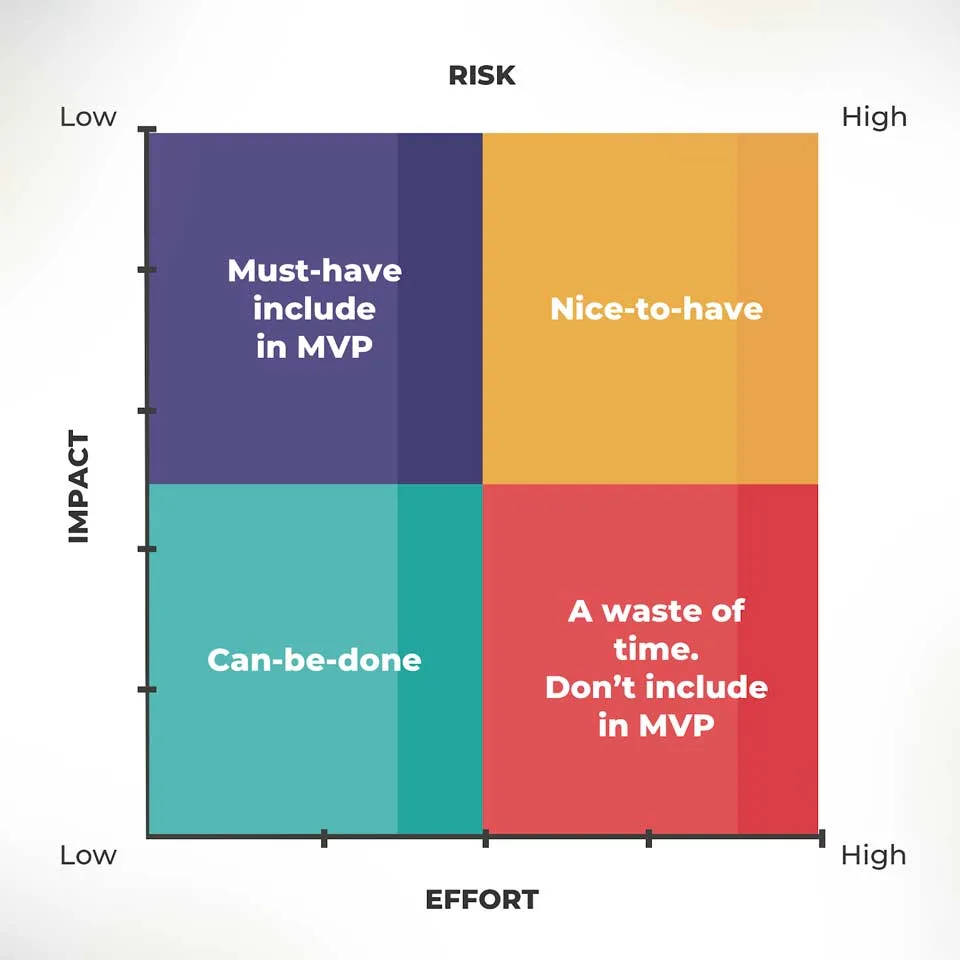
Four-Quadrant Chart: A Four-Quadrant Chart, also known as a Quadrant Analysis or a Cartesian Chart, is a graphical tool used to categorize data into four quadrants based on two independent variables. The chart typically has two axes (horizontal and vertical) representing these variables. Each axis divides the chart into two halves, creating four quadrants. The data points are plotted on the chart based on their values for the two variables, with each quadrant representing a different combination of high and low values for the variables. Four-Quadrant Charts are commonly used in business, management, and decision-making to analyze and prioritize strategies, projects, or products based on criteria such as profitability, market growth, risk, or performance.

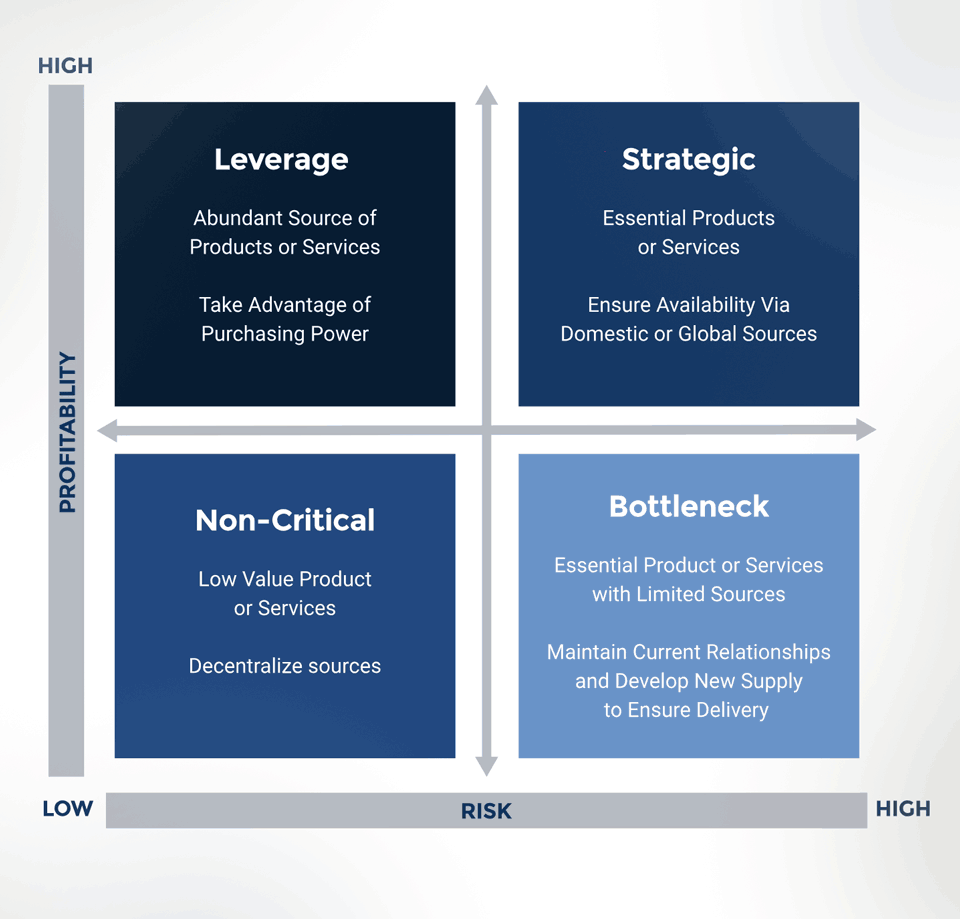
Business Matrix: A Business Matrix, also known as a Decision Matrix or Grid Analysis, is a structured decision-making tool used to evaluate and prioritize alternatives based on multiple criteria or factors. It consists of a matrix with criteria listed along the rows and alternatives listed along the columns. Each cell in the matrix represents the intersection of a criterion and an alternative, where scores or ratings are assigned to evaluate the performance of each alternative against each criterion. Business Matrices help in systematically comparing and selecting the best option among competing alternatives, considering various factors such as cost, quality, time, and feasibility. They are widely used in project management, product development, supplier selection, and strategic planning to support decision-making processes and enhance transparency in evaluations.

What is the difference between The Four-Quadrant Chart and a Business Matrix?

The Four-Quadrant Chart and a Business Matrix are both tools that use matrices and can aid decision-making, they have distinct applications and structures. The Four-Quadrant Chart focuses on visualizing relationships between variables, while the Business Matrix is geared towards evaluating and prioritizing alternatives based on predefined criteria.

The Four-Quadrant Chart is primarily used to categorize data into four quadrants based on two independent variables. It helps visualize relationships between variables and identify patterns or trends within the data. This type of chart is often used in business to analyze strategies, products, or projects based on criteria like risk and reward, cost and benefit, or effort and impact.

On the other hand, the Business Matrix, also known as a Decision Matrix or Grid Analysis, is a tool used to evaluate and prioritize alternatives based on multiple criteria or factors. It involves creating a matrix where alternatives are listed in rows and criteria are listed in columns. Scores or ratings are then assigned to each alternative based on its performance against each criterion. The Business Matrix facilitates systematic comparison and selection of the best option among competing alternatives, considering various factors such as cost, quality, and feasibility.

Let’s look at two real-world examples of the Four-Quadrant Chart and the Business Matrix.

Four-Quadrant Chart Example: Imagine a software development company evaluating its various projects based on their potential profitability and technical complexity.

They could use a Four-Quadrant Chart to plot each project based on these two factors. Projects with high potential profitability and low technical complexity would be placed in one quadrant, representing low-risk, high-reward opportunities. Conversely, projects with low profitability and high technical complexity would fall into another quadrant, indicating high-risk, low-reward endeavors. This visualization helps the company prioritize projects based on their alignment with strategic objectives and resource allocation.

  • Strengths:
    • Visual representation: Provides a clear and intuitive visual representation of relationships between two variables.
    • Simple interpretation: Easy to understand and interpret, making it suitable for communicating key insights to stakeholders.
    • Quick analysis: Allows for quick identification of patterns or trends within the data.
  • Limitations:
    • Limited to two variables: Can only analyze relationships between two variables, which may not capture the full complexity of some situations.
    • Subjectivity: Placement of data points within quadrants may be subjective, depending on how criteria are defined and measured.

Business Matrix Example: Consider a manufacturing company seeking to select a supplier for a critical component. They could create a Business Matrix to evaluate several potential suppliers based on criteria such as quality, cost, reliability, and location. Each supplier would be assessed and scored against these criteria, with ratings ranging from poor to excellent. By comparing the scores for each supplier across all criteria, the company can identify the most suitable option. For instance, a supplier may excel in quality but have higher costs, while another may offer lower costs but with less reliability. The Business Matrix allows the company to make an informed decision based on a comprehensive evaluation of each supplier’s strengths and weaknesses.

  • Strengths:
    • Comprehensive evaluation: Allows for a comprehensive evaluation of alternatives based on multiple criteria or factors.
    • Structured decision-making: Provides a structured framework for comparing and prioritizing alternatives objectively.
    • Flexibility: Can accommodate a wide range of criteria and alternatives, making it suitable for complex decision-making scenarios.
  • Limitations:
    • Data collection: Requires detailed data collection and scoring for each criterion, which can be time-consuming and resource-intensive.
    • Complexity: The matrix structure may become unwieldy with a large number of alternatives or criteria, leading to potential information overload.
    • Subjectivity: Scoring criteria and assigning weights to criteria may involve subjective judgment, potentially leading to bias.

The choice between a Four-Quadrant Chart and a Business Matrix depends on factors such as the complexity of the decision-making task, the number of variables or criteria involved, and the preference for visual representation versus structured evaluation. Both tools have their strengths and limitations, and selecting the most appropriate one requires careful consideration of the specific requirements and objectives of the analysis.

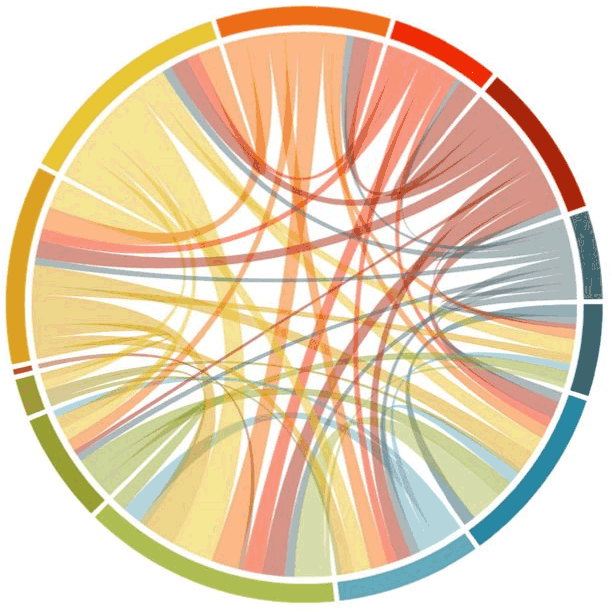
Chord diagrams are commonly used to represent pairwise relationships, such as trade flows between countries, connections between nodes in a social network, or co-occurrences of items in a dataset.

Different types of diagrams

Diagrams are visual representations used to convey information, concepts, relationships, or processes in a structured and easily understandable manner. They come in various forms, each tailored to suit specific purposes and audiences.

Venn Diagram: Venn diagrams are used to show the relationships between different sets of items. They consist of overlapping circles, each representing a set, with the overlapping areas indicating items that belong to multiple sets. Venn diagrams are commonly used in mathematics, logic, statistics, and problem-solving scenarios to visualize the intersections and differences between various groups or categories. They help in analyzing similarities and differences between different elements or concepts.

Network Diagram: Network diagrams, also known as graph diagrams, illustrate the connections and relationships between various nodes or elements within a network. They are commonly used in computer science, telecommunications, project management, and systems engineering to depict the interactions between interconnected components. Network diagrams consist of nodes (representing entities or objects) and edges (representing the connections or relationships between them). These diagrams help in visualizing complex systems, identifying dependencies, and understanding the flow of information or resources within a network.

Alluvial Diagram: An Alluvial diagram is a type of flow diagram that represents changes over time or between different categories. It is particularly useful for visualizing the flow and relationships between multiple categorical variables across different stages or time periods. Alluvial diagrams use interconnected streams to show the transitions of items between categories. They are commonly used in data visualization to analyze complex datasets, such as migration patterns, product flows, or categorical data with multiple dimensions.

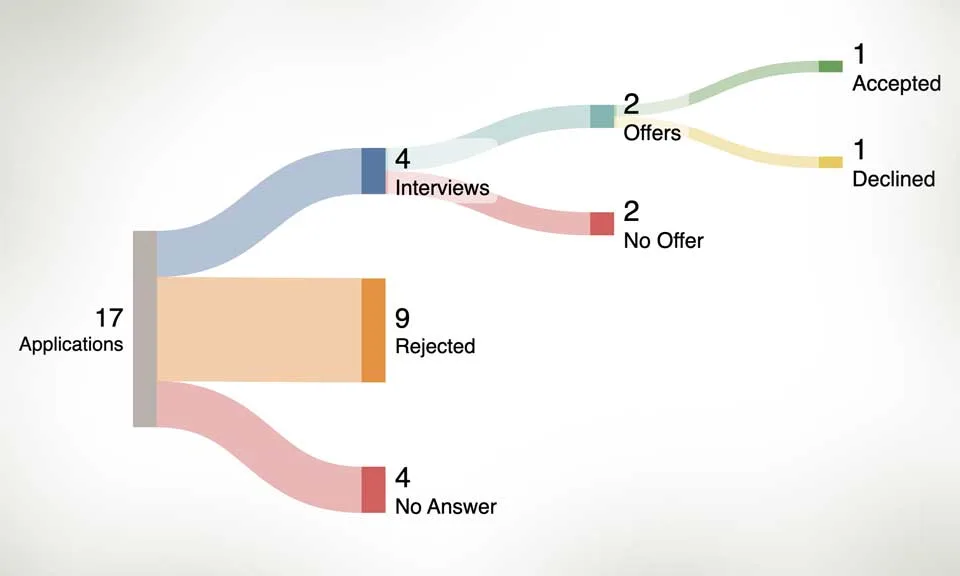
Example of a Sankey diagram used for hiring.

Sankey Diagram: A Sankey diagram is a type of flow diagram that visualizes the flow of energy, resources, or quantities through a system. It consists of nodes representing the sources and destinations of flows, connected by directed links representing the flow paths and their magnitudes. Sankey diagrams are effective in illustrating the distribution, transformation, and efficiency of resources or processes. They are widely used in engineering, environmental science, and business to analyze energy flows, material balances, and resource allocations.

Chord Diagram: A Chord diagram is a circular graphical method used to visualize the relationships and connections between entities within a network or dataset. It consists of arcs that connect points around the circumference of a circle, with the width of each arc proportional to the strength or frequency of the connection between the corresponding entities. Chord diagrams are commonly used to represent pairwise relationships, such as trade flows between countries, connections between nodes in a social network, or co-occurrences of items in a dataset. They provide a concise and intuitive way to explore complex networks and identify patterns of interaction.

Defect Concentration Diagram: A Defect Concentration diagram, also known as a Pareto chart, is a specialized type of bar chart used to prioritize and visualize the frequency or impact of different types of defects, problems, or causes within a system or process. It consists of bars arranged in descending order of frequency or severity, with the cumulative percentage of occurrences represented by a line graph. Defect Concentration diagrams help in identifying the most significant contributors to overall issues or problems, allowing organizations to focus their efforts on addressing the most critical areas for improvement. They are commonly used in quality management, process improvement, and problem-solving methodologies such as Six Sigma.

Mind Map: A mind map is a hierarchical diagram used to visually organize information around a central concept or theme. It consists of a central idea or topic branching out into subtopics or related concepts, which further branch into more detailed or specific information. Mind maps are often used in brainstorming, note-taking, problem-solving, and decision-making processes to capture ideas, explore relationships, and stimulate creative thinking. They provide a structured yet flexible framework for organizing thoughts and concepts in a non-linear fashion.

Flowchart: Although a flowchart is typically referred to as a chart it can also be defined as a diagram representing a process or workflow.

The importance of Data Visualization for Business Professionals

In the contemporary data-driven landscape, where vast amounts of information are generated daily, data visualization plays a pivotal role in simplifying complexity.

Through visually engaging formats like graphs, charts, and diagrams, professionals can effectively convey intricate concepts, discern trends, identify anomalies, and unveil patterns within datasets. These visual representations not only aid comprehension but also expedite and enhance the accuracy of decision-making processes. Additionally, data visualization fosters collaboration among teams by providing a shared language through which stakeholders can interpret and analyze data, thus promoting alignment and consensus.

Effective visual communications start with a plan.

Building an effective chart or graph begins with a clear understanding of the data to be visualized and the intended message to convey.

Our process typically involves several key steps, starting with data collection and organization. Once the data is gathered, it’s essential to select the most appropriate type of chart or graph that aligns with the nature of the data and the insights sought. This decision considers factors such as the relationships between variables, the temporal aspects of the data, audience’s preferences and ease of use by the viewer. Next, the chosen chart or graph is designed and constructed with the goal of ensuring clarity, accuracy, and visual appeal. Labels, titles, and axis descriptions are added to provide context and aid interpretation. Throughout the process, attention to detail is key to ensuring the accuracy and integrity of the visual representation. Finally, the completed chart or graph is reviewed by the team and refined as necessary to optimize its effectiveness in communicating the desired information clearly and concisely to stakeholders or decision-makers.

  • « Go to Previous Page
  • Page 1
  • Interim pages omitted …
  • Page 4
  • Page 5
  • Page 6
  • Page 7
  • Page 8
  • Go to Next Page »

Velocity Ascent

© 2026 Velocity Ascent · Privacy · Terms · YouTube · Log in